
This article is part of a series compiling the perspectives of contributors and users. Do you also have something to share? Connect with us on Slack.
The GatherPress Team
Sometimes it is amazing to see and feel how simple ideas evolve. Let me tell you a cool story I encountered, while contributing to GatherPress.
Backstory
I came to find the plugin 2,5 years ago looking for a solid and future-proof, a.k.a. block-based and FSE-ready, path to bring a lot of theater-related custom code into a bigger refactoring. All based on an event-plugin, that is still around, but has never caught up with modern WordPress.
I was very happy to find GatherPress in a good shape, handling data in a way I liked, integrating into core UI as it was not even a plugin, providing blocks for the necessary pieces and last but not least, it being a community-owned project with no upsell-bingo at all. Great!
The GatherPress team, all real people — not companies — from around the globe, all volunteers to the idea and spending their spare time on the project, welcomed me openly, invited me to their regular team-meetings and we discussed a lot of ideas in the upcoming months. I wrote issues, joined their slack-channel and even started creating own PRs to the project.
Most often, I do think about event-management on WordPress from the perspective of running a theater. Because this is what my wife, the team and I do for a living. We’re a contemporary art puppetry company traveling around mainly in Germany but even abroad.
On our website, we promote our next events with dates and venues, but do not sell tickets ourselves or collect RSVPs. This is most of the time the job of our clients, the theaters or venues we’re playing at. Because our contractors sell the tickets or provide workshop registration forms themselves, we often “just” reference their ticketing platform with a link.
This being our regular workflow, we had no need for GatherPress’ RSVP functionality at all. With full respect to all the efforts that went into the feature, I wanted to have it disabled for our website, so I created issue number 6881 to ask for a button to switch off this particular feature.
GatherPress’ switch to post_type_supports
To be honest, because I have worked with WordPress for a while and know a little about how things are wired up, I didn’t really ask for a button. I asked for post_type_supports2.
Arguing that the core plugin should register its features as supports to its existing default post types and that that would not harm the plugin, but would allow theme and plugin developers or website owners to purposely disable specific aspects.
The original issue
Make features be post_type_support(s)
After the core maintainer picked up my issue and provided a first working solution, I couldn’t believe what was presented to me. He took the initial idea in all of its details, took it even further and mapped everything that differentiates an event from a regular post into its own named post type support. Followed by the same refactoring for venues, the GatherPress plugin became the home of plenty of versatile post type supports.
Not a button, but a pretty nice solution to my initial request – disabling RSVPs for events can now be done like this:
add_filter( 'register_post_type_args', function ( array $args, string $post_type ): array {
    if ( 'gatherpress_event' !== $post_type ) {
        return $args;
    }

    // Remove 'gatherpress-rsvp' from the supports array if it exists.
    if ( isset( $args['supports'] ) && is_array( $args['supports'] ) ) {
        $args['supports'] = array_values(
            array_diff( $args['supports'], [ 'gatherpress-rsvp' ] )
        );
    }

    return $args;
}, 10, 2 );
The cool thing about supports is, that it can not only be unregistered as needed, but also can be registered onto own post types completely outside of GatherPress’ core.
Create your event plugin with one line of code
Besides the obvious, I was able to just declare gatherpress-event-date support onto a new “Theater productions” post type, which transformed my new, blank post type immediately into a date-aware type. Queryable, sorted by default by this custom date, with all editor and admin UI for handling a custom date and even including full iCal support. And a bunch of custom blocks to be used with this kind of custom data on top of all that.
Took me only minutes to recognize that I could do the same with a new “Theater Season” post type. With one line of code. Amazing!
Because I wanted to use the native GatherPress Events either way, making the decision to chain up this hard dependency became a no-brainer and easy to decide for. The combination of GatherPress core together with a very thin companion plugin provided me with an Event post type to manage our actual performances, a Production post type, powered by its Premiere date and a Seasons post type that is described by a wider time range.
As a theater website is a complex set of interconnected types, I needed to connect my events to productions, all happening within a season. Relations I’ve done with posts-2-posts3 in the past, but was looking for a closer-to-core solution for a while. I was looking for a way to connect my events to other types, similar to how events are connected to venues.
Thanks to the great additions from version 0.34.0, I was able to set up this interconnection easily using another post_type support. I had to declare gatherpress-shadow-source support onto my new productions and seasons types and got all the little details it takes for a great editor experience and a solid data scheme.

Complex contextual queries – Proudly powered by WordPress, built on GatherPress
On the frontend, the rendering can easily be made very dynamic, while still being block-based and FSE-ready.
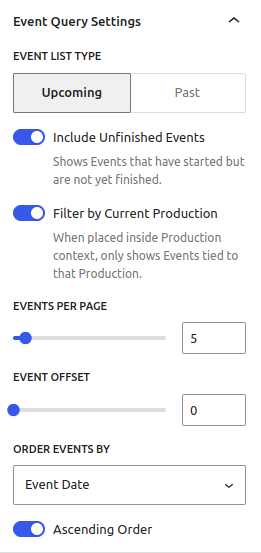


This kind of contextual, singular query is typically not possible with WordPress core, nor with Advanced-Query-Loop4 and not with my very own try of a contextual-queries block filter5. But it is with GatherPress, and it is re-usable for every third party plugin.
And you may even benefit from all that, if you don’t create plugins. One thing I’ve often been doing in the past, was to rename a post types labels created by a plugin. The English “Events” translates to the German word “Veranstaltungen”. This long word does not play very nicely with Admin UI, so I used to change it to say “Termine”, which is more like “Dates”, but works in our context and is much shorter.
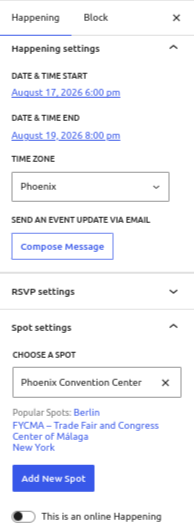
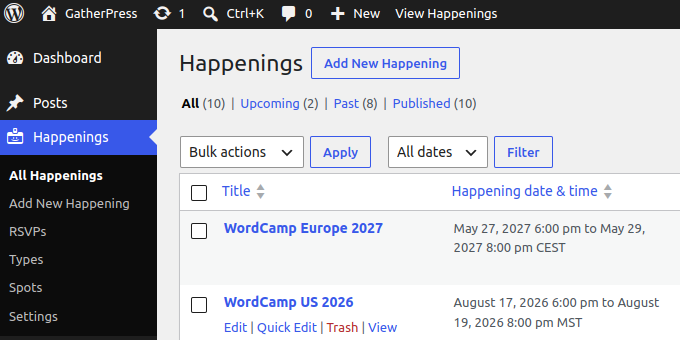
Fortunately, GatherPress plays very nice with people wanting to change default labels. Just apply post_type_labels_post_type6 on gatherpress_event and gatherpress_venue respectively to get “Happenings” running at “Spots”.

Now launch one of the prepared Playgrounds or get version 0.34.0 of GatherPress now and start extending!
Start extending
Footnotes
- https://github.com/GatherPress/gatherpress/issues/688 ↩︎
- https://developer.wordpress.org/reference/functions/post_type_supports/ ↩︎
- https://wordpress.org/plugins/posts-to-posts/ ↩︎
- https://wordpress.org/plugins/advanced-query-loop/ ↩︎
- https://github.com/carstingaxion/contextual-query-loops ↩︎
- https://developer.wordpress.org/reference/hooks/post_type_labels_post_type/ ↩︎
Leave a Reply