
Last updated July 11, 2026, Version 0.34
The following GatherPress blocks support an Event ID Override.
- Event Date
- Add to Calendar
- RSVP
- RSVP Form
- RSVP Response
- RSVP Count
- Online Event
- Venue
What this allows:
- By default, event blocks use the current event context. ID Override will display RSVP-related information outside of the event page.
- Place RSVP, attendance status, or related UI elements on other pages or posts.
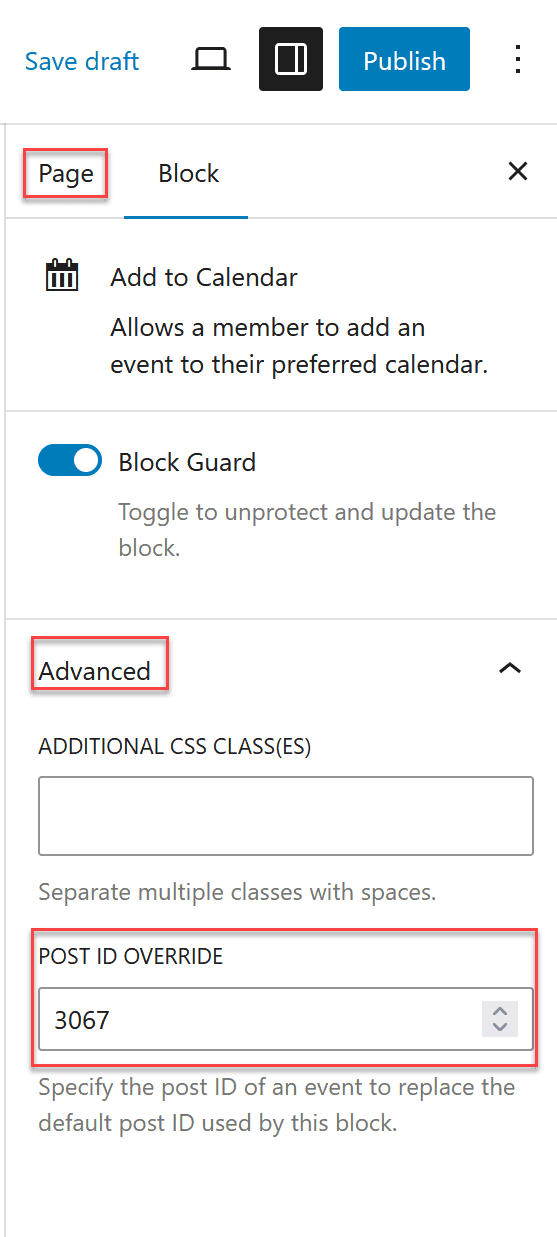
This is found when selecting a block that supports it, clicking “Advanced” and adding a valid event post ID to “Post ID Override”. When an Event ID is provided, the block explicitly targets that event instead.
The Venue block accepts either an event ID or a venue ID in the override field. When given an event ID, it resolves to that event’s associated venue; when given a venue ID, it uses that venue directly.
In the editor, the block dims while no override is set (or the ID is invalid) and lights up to full opacity once a valid published event ID is entered — a quick visual confirmation that the override is wired up correctly.
Typical use cases:
- Showing RSVP or attendance information on a custom landing page.
- Reusing RSVP UI in a modal or sidebar outside the single event layout.